
DiskMagik3.6 - Download
You'll be able to download in few seconds.
Publisher Description
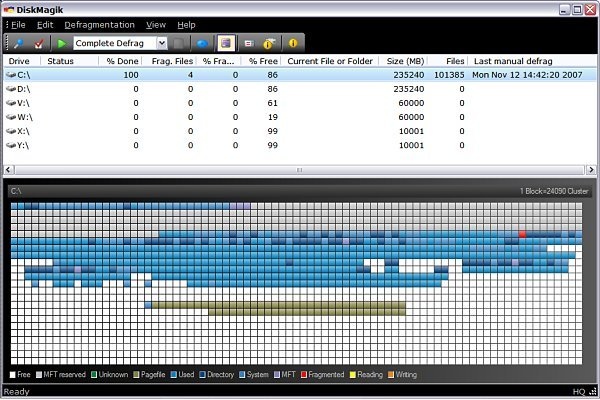
DiskMagik is an intelligently designed utility to defragment the hard drive of a Windows PC. Compatible with Windows 2000/XP/Vista, DiskMagik has several powerful features not included in the Windows defrag utility including the ability to rearrange and reprioritize the order of files on the disk, including the Windows Pagefile, permitting faster file access on demand. In addition, it includes optional Boot-time defrag and our exclusive "Proactive Defragmentation" technology. This extraordinary feature gives you the option to run DiskMagik silently in the background at all times. A MUST-HAVE for all computer users interested in maintaining their computer's performance to help keep your system in peak operating condition.
Do not confuse DiskMagik and the performance enhancement it provides with registry optimizers. The Windows registry is an important component of Windows performance, but optimizing your registry does absolutely nothing about optimizing your computer's hard drive. The hard disk drive on a Windows PC is by far the slowest component on your PC. Even high amounts of memory (RAM) and a fast processor cannot overcome the limitations of a slow disk drive... and nothing slows a hard drive down like excessive fragmentation!
Although DiskMagik is a powerful tool suitable for advanced users, it is also perfect for the novice as well. A very user friendly multi step configuration wizard makes the initial setup a snap. Use DiskMagik with full confidence to enhance your computer's performance and keep your system in peak operating condition.
About DiskMagik
This File & Disk Management program is available in English. It was last updated on 29 September, 2026. DiskMagik is compatible with the following operating systems: Windows.
The company that develops DiskMagik is Rose City Software. The latest version released by its developer is 3.6.
The download we have available for DiskMagik has a file size of 2.1 MB. Just click the green Download button above to start the downloading process. The program is listed on our website since 2009-08-09 and was downloaded 0 times. We have already checked if the download link is safe, however for your own protection we recommend that you scan the downloaded software with your antivirus. Your antivirus may detect the DiskMagik as malware if the download link is broken.
How to install DiskMagik on your Windows device:
- Click on the Download button on our website. This will start the download from the website of the developer.
- Once the DiskMagik is downloaded click on it to start the setup process (assuming you are on a desktop computer).
- When the installation is finished you should be able to see and run the program.
Program Details
System requirements
Download information
Pricing
Version History
version 3.6
posted on 2009-08-09
updates for Win7 compatibility
version 2.2
posted on 2007-12-14
Disclaimer
External Download
We do not host DiskMagik on our servers. We did not scan it for viruses, adware, spyware or other type of malware. This app is hosted by the software publisher and passed their terms and conditions to be listed there. We recommend caution when installing it.
The external download link for DiskMagik is provided to you by apps112.com without any warranties, representations or guarantees of any kind, so access it at your own risk.
If you have questions regarding this particular app contact the publisher directly. For questions about the functionalities of apps112.com contact us.
